
[리액트 프로그래밍 정석] 리덕스로 데이터 관리하기_1
리덕스란?
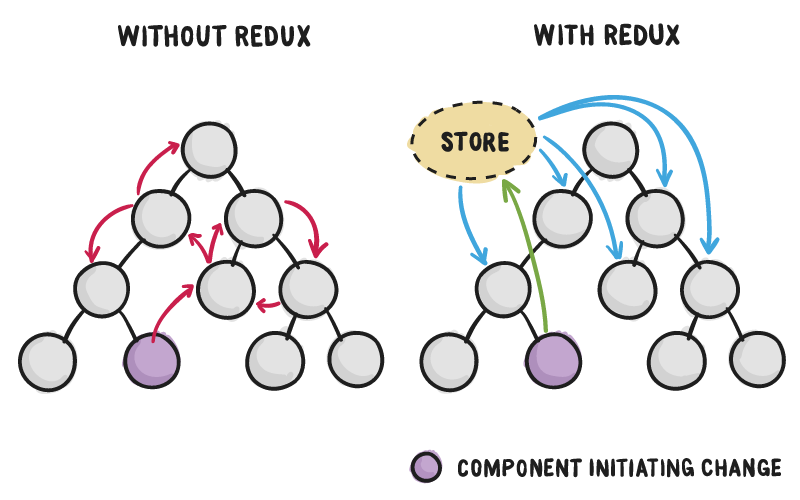
리덕스는 컨텍스트보다 조금 더 체계적으로 데이터를 관리한다. 리덕스 또한 데이터 관리를 위해 만들어진 기술이므로 데이터 중심으로 개념을 살피면 좋다. 리덕스는 데이터를 스토어(store)라는 곳에서 관리한다. 리덕스는, 가장 사용률이 높은 상태관리 라이브러리로, 리덕스를 사용하면, 여러분이 만들게 될 컴포넌트들의 상태 관련 로직들을 다른 파일들로 분리시켜서 더욱 효율적으로 관리 할 수 있다. 또한, 컴포넌트끼리 상태를 공유하게 될 때 여러 컴포넌트를 거치지 않고도 손쉽게 상태 값을 전달 할 수 있다.
추가적으로, 리덕스의 미들웨어라는 기능을 통하여 비동기 작업, 로깅 등의 확장적인 작업들을 더욱 쉽게 할 수도 있게 해준다.
리덕스 개발준비를 위해 아래 명령어들을 이용한다.
> yarn add redux react-redux
> yarn add redux-devtools-extension --dev
액션과 리듀서의 관계
액션은 다음에서 보듯 {type:…, payload:…} 구조로 된 객체이다. type은 액션이 어떤 작업인지 쉽게 이해할수 있는 고유한 값(중복되지 않은 값)을 구분한 문자열로 넣어준다. (흔히들 대문자와 언더스코어를 이용해 type값을 지정하는듯 보인다.) payload는 스토어에 사용될값이다. 이때 키 이름 type은 바꾸면 안되고, payload는 다른 이름으로 지어도 된다.
{
type:"SET_LOADING",
payload:true,
}
{
type:"SET_USER",
payload:{name:"Park", age:20}
}
리듀서는 다음과 같은 간단한 함수 구조를 가진다.
function reducer(state,action) {return state; }
리듀서는 스토어의 이전 데이터(state),액션(action)을 받아 새로운 스토어의 데이터를 반환한다. 다음은 스토어의 이전 데이트(state)를 새로운 데이터(state+action.payload)로 변경한다.
const reducer= (state,aciton)=> state+ action.payload;
이때 리듀서가 반환하는 값의 자료형은 스토어의 이전 데이터와 동일해야 한다는점에 주의해야한다. 액션은 dispatch()함수를 통해 리듀서로 전달된다. (이제부터 아래같은 구조로 리듀서와 액션을 분리하여 코드를 써보자!)
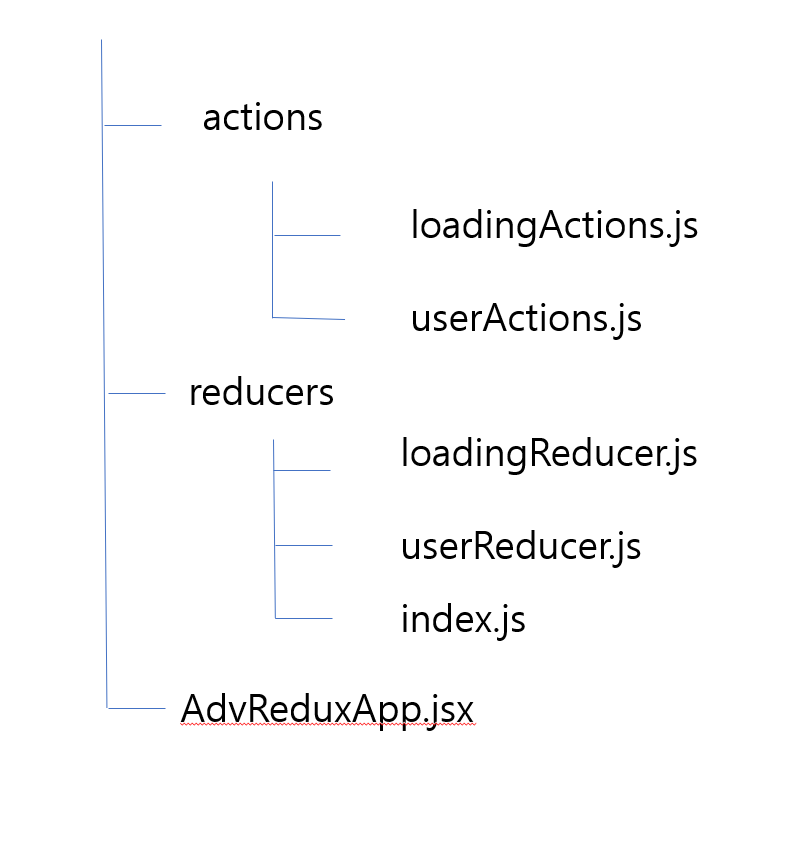
- 리듀서 분리하기
[reducers/loadingReducer.jsx]
import { SET_LOADING, RESET_LOADING } from '../actions/loadingActions';

const initState = false;

export default function reducer (state = initState, action) {
  const { type, payload } = action;
  switch(type) {
    case SET_LOADING: {
      return payload;
    }
    case RESET_LOADING: {
      return initState;
    }
    default:
      return state;
  }
};
[reducers/userReducer.jsx]
import { SET_USER } from '../actions/userActions';

export default function reducer(state = {}, action) {
  const { type, payload } = action;

  switch(type) {
    case SET_USER: {
      return {
        ...state,
        ...payload,
      };
    }
    default:
      return state;
  }
}
[reducers/index.jsx]
import loading from './loadingReducer';
import user from './userReducer';
// import collection from './collectionReducer01';
// import collection from './collectionReducer02';
import collection from './collectionReducer';
import searchFilter from './searchFilterReducer';

export default {
  collection,
  loading,
  user,
  searchFilter,
};
[07/configureStore.js]
import { createStore, combineReducers } from 'redux';
import { composeWithDevTools } from 'redux-devtools-extension';
import reducers from './reducers';

export default initStates => createStore(
  combineReducers(reducers),
  initStates,
  composeWithDevTools(),
);
[07/AdvReduxApp01.jsx]
import React, { PureComponent } from 'react';
import { Provider } from 'react-redux';
import configureStore from './configureStore';

class AdvReduxApp extends PureComponent {
  store = configureStore({ loading: false });

  componentDidMount() {
    this.store.dispatch({
      type: 'SET_LOADING',
      payload: true,
    });
    this.store.dispatch({
      type: 'RESET_LOADING',
    });
    this.store.dispatch({
      type: 'SET_USER',
      payload: { name: 'Park', age: 20 },
    });
  }

  render() {
    return <Provider store={this.store}>리덕스 예제</Provider>;
  }
}
export default AdvReduxApp;
- 액션 분리하기
[07/actions/loadingActions.js]
export const SET_LOADING = 'loading/SET_LOADING';
export const RESET_LOADING = 'loading/RESET_LOADING';

export const setLoading = loading => ({
  type: SET_LOADING,
  payload: loading,
});

export const resetLoading = () => ({
  type: RESET_LOADING
});
[07/actions/userActions.js]
export const SET_USER = 'user/SET_USER';

export const setUser = user => ({
  type: SET_USER,
  payload: user,
});
[07/actions/AdvReduxApp02.jsx]
import React, { PureComponent } from 'react';
import { Provider } from 'react-redux';
import configureStore from './configureStore';
import { setLoading, resetLoading } from './actions/loadingActions';
import { setUser } from './actions/userActions';

class AdvReduxApp extends PureComponent {
  store = configureStore({ loading: false });

  componentDidMount() {
    this.store.dispatch(setLoading(true));
    this.store.dispatch(resetLoading());
    this.store.dispatch(setUser({ name: 'Park', age: 20 }));
  }

  render() {
    return <Provider store={this.store}>리덕스 예제</Provider>;
  }
}
export default AdvReduxApp;