
[리액트 프로그래밍 정석] 리덕스 고급 기능 활용하기
미들웨어란?
리덕스의 단방향 데이터 흐름 속에서 액션을 검사하는 검문소 역할을 한다. 미들웨어는 리덕스에서 특정 액션에 연쇄로 일어나는 액션을 추가하거나 액션을 함수형으로 취급하여 추가 작업을 할수 있게 해준다.
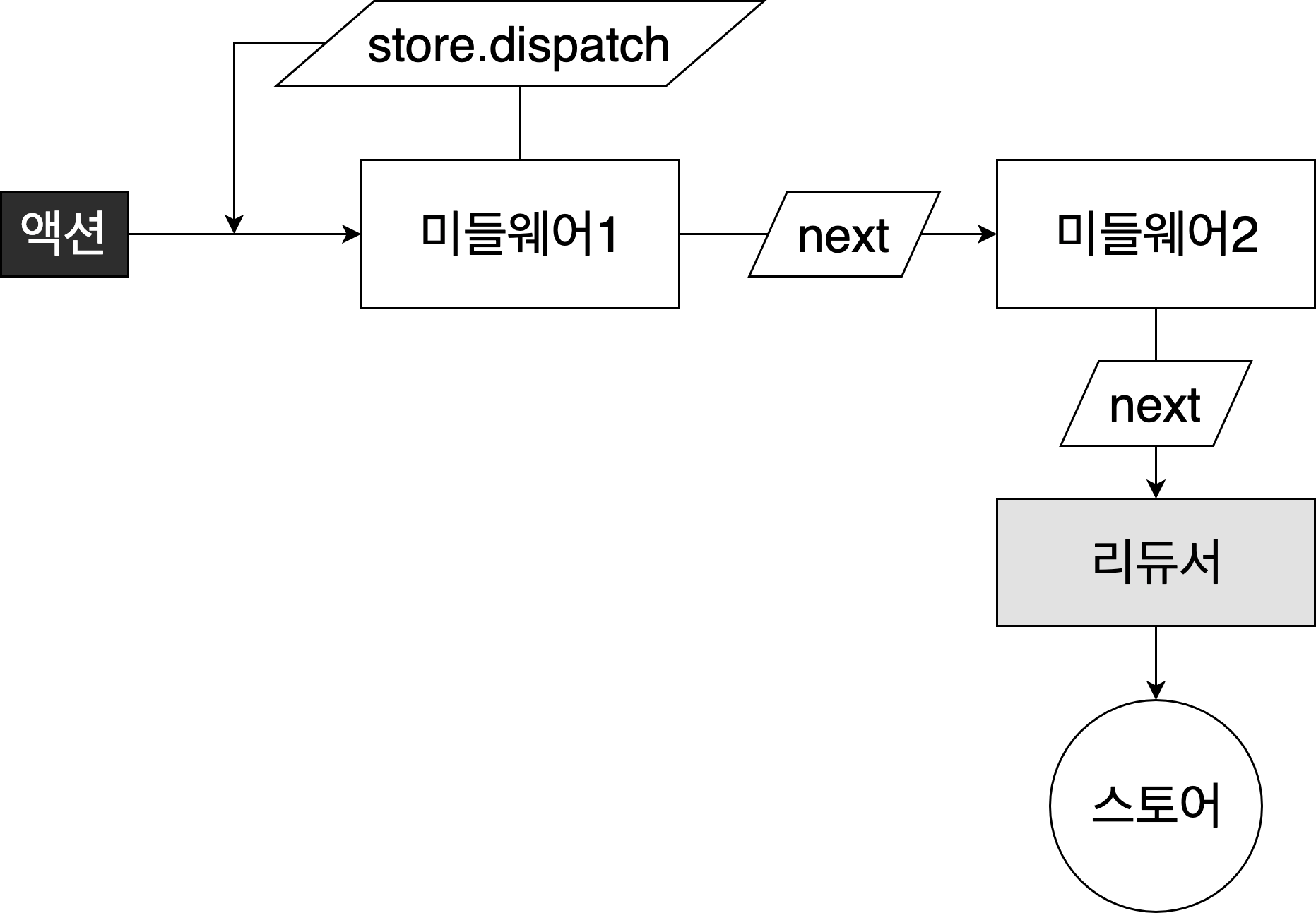
리덕스에서 데이터는 단방향으로 흐르는데 만약 데이터를 검사하고 싶다면 액션과 스토어 사이의 길목을 관찰하면 된다. 여기서 미들웨어는 리듀서 전후에 위치한다. (사실 리덕스 크롬 확장도구가 미들웨어의 감시 기능을 응용하여 개발된 도구라고 한다.)
미들웨어 코드
const middleware= store=>nextRunner=>action=>nextRunner(action);
//혹은
function middleware(store){
  return function(nextRunner){
    return function(action){
      //리듀서 실행 이전
      const result=nextRunner(action);
      //리듀서 실행 이후
      return result;
      }
   }
}
다시말해, 리덕스 미들웨어를 사용하면 액션이 디스패치 된 다음, 리듀서에서 해당 액션을 받아와서 업데이트하기 저에 추가적인 작업을 할수 있다.
- 특정 조건에 따라 액션이 무시되게 만들수 있다.
- 액션을 콘솔에 출력하거나, 서버쪽에 로깅을 할수 있다.
- 액션이 디스패치 됐을 때 이를 수정해서 리듀서에게 전달되도록 할 수 있다.
- 특정 액션이 발생했을 때 이에 기반하여 다른 액션이 발생되도록 할 수 있다.
- 특정 액션이 발생했을 때 특정 자바스크립트 함수를 실행시킬 수 있다.
보통 리덕스에서 미들웨어를 사용하는 주된 사용 용도는 비동기 작업을 처리 할 때다. 예를 들어 리액트 앱에서 우리가 만약 백엔드 API 를 연동해야 된다면, 리덕스 미들웨어를 사용하여 처리하곤 한다. 리덕스 미들웨어는 누구든지 만들어서 사용 할 수 있지만, 일반적으로는 리덕스 미들에웨어 라이브러리를 설치하여 사용한다. 비동기 작업에 관련된 미들웨어 라이브러리는 redux-thunk, redux-saga, redux-observable, redux-promise-middleware 등이 있다. 비동기작업을 처리하는 redux-thunk와 redux-saga라는 라이브러리를 가장 많이 사용하는듯하다.
미들웨어로 알림 메시지 띄우기
알림 액션과 리듀서 분리하기
[src/08/actions/notificationActions.js]
export const SHOW_NOTIFICATION = 'notification/SHOW_NOTIFICATION';
export const HIDE_NOTIFICATION = 'notification/HIDE_NOTIFICATION';

export function showMessage(message, warning = false) {
  return {
    type: SHOW_NOTIFICATION,
    payload: { message, warning },
  }
}

export function hideMessage() {
  return {
    type: HIDE_NOTIFICATION,
  }
}
[src/08/reducers/notificationReducer.js]
import {
  SHOW_NOTIFICATION,
  HIDE_NOTIFICATION,
} from '../actions/notificationActions';

const initState = {
  message: '',
  warning: false,
  showMessage: false,
};

export default (state = initState, action) => {
  const { type, payload } = action;

  switch (type) {
    case SHOW_NOTIFICATION: {
      const { message, warning } = payload;
      return {
        ...state,
        showMessage: true,
        message,
        warning,
      };
    }
    case HIDE_NOTIFICATION: {
      return {
        ...state,
        message: '',
        showMessage: false,
      };
    }
    default:
      return state;
  }
};
[src/08/reducers/index.js]
// import transactions from './transactionsReducer';
import notification from './notificationReducer';
import createReducers from '../../11/api-redux-pack/createReducers';
import searchFilter from './searchFilterReducer';
import router from './routerReducer';

const apiReducers = createReducers('transactions', 'users');

export default {
  ...apiReducers,
  notification,
  searchFilter,
  router,
  // transactions,
};
[src/08/containers/NotificationContainer.js]
//Notification 컴포넌트와 리듀서를 연결하여 데이터 컴포넌트 만들기
import { connect } from 'react-redux';
import Notification from '../components/Notification';

const mapStateToProps = state => {
  const { showMessage, message, warning } = state.notification;

  return { showMessage, message, warning };
};

export default connect(mapStateToProps)(Notification);
[src/08/components/Notification.jsx]
import React, { PureComponent } from 'react';
import PropTypes from 'prop-types';
import Toast from '../../doit-ui/Toast';

class Notification extends PureComponent {
  render() {
    const { showMessage, message, warning } = this.props;
    return showMessage && (
      <Toast message={message} warning={warning} />
    );
  }
}

Notification.propTypes = {
  showMessage: PropTypes.bool,
  warning: PropTypes.bool,
  message: PropTypes.string,
};

export default Notification;
[src/08/actions/transactionActions.js]
import Api from '../Api';
import { showMessage } from './notificationActions';

export const LOADING_TRANSACTION_LIST = 'transaction/LOADING_TRANSACTION_LIST';
export const SET_TRANSACTION_LIST = 'transaction/SET_TRANSACTION_LIST';
export const SET_ERROR = 'transaction/SET_ERROR';
export const TRADE_COMPLETE = 'transaction/TRADE_COMPLETE';

export function loading() {
  return {
    type: LOADING_TRANSACTION_LIST,
  };
}

export function setError(errorMessage) {
  return {
    type: SET_ERROR,
    payload: { errorMessage },
  };
}

export function setTransactionList(transactions) {
  return {
    type: SET_TRANSACTION_LIST,
    payload: transactions,
  };
}

export function requestTransactionList(params) {
  return dispatch => {
    dispatch(loading());
    Api.get('/transactions', { params }).then(
      ({ data }) => dispatch(setTransactionList(data)),
      error => {
        dispatch(setError(error.response.data.errorMessage));
        // 어차피 미들웨어를 통해 해결할것이기에 아래함수는 필요없다.
        // dispatch(showMessage(error.response.data.errorMessage, true));
      },
    );
  };
}

export function tradeComplete() {
  return { type: TRADE_COMPLETE };
}

export function createTransaction(data, onComplete) {
  return dispatch =>
    Api.post('/transactions', data).then(
      ({ data }) => {
        dispatch(tradeComplete());
        onComplete();
      },
      error => dispatch(setError(error.response.data.errorMessage)),
    );
}
미들웨어로 알림 자동으로 표시하기
미들웨어의 감시 기능(어떤 type의 액션이 왔는지 감시)을 활용하면 액션에 액션을 추가할수 있다. 예를 들어 SET_ERROR액션이 실행된 이후 SET_ERROR액션이 맞다면 알림 액션 함수(SHOWmESSAGE)를 실행하도록 할수 있다. 여기서 특정상황에서 추가 액션을 호출하는 미들웨어를 ‘효과(effect) 미들웨어’라고 한다. 이제 SET_ERROR에 대한 액션을 분리하여 알림을 호출하는 효과 미들웨어를 구성해볼것이다. [src/08/middlewares/notificationEffects.js]
// import { SET_ERROR } from '../actions/transactionActions';
import { KEY, LIFECYCLE } from 'redux-pack';
// import { FETCH_TRANSACTION_LIST } from '../actions/transactionPackActions';
import { SHOW_NOTIFICATION, showMessage, hideMessage } from '../actions/notificationActions';
import { debounce } from '../../02/debounce';

const debounceRunner = debounce(action => action(), 4000);

// let prevHideCaller;
export default store => nextRunner => action => {
  const { type, payload, meta } = action;
  const result = nextRunner(action);
  if (meta && meta.notification) {
    const { success, error } = meta.notification;
    if (success && meta[KEY.LIFECYCLE] === LIFECYCLE.SUCCESS) {
      store.dispatch(showMessage(success));
    } else if (error && meta[KEY.LIFECYCLE] === LIFECYCLE.FAILURE) {
      const { errorMessage } = payload.response ? payload.response.data : {};
      store.dispatch(showMessage(errorMessage || error, true));
    }
    // } else if (type === SET_ERROR) {
    //   const { errorMessage } = payload;
    //   store.dispatch(showMessage(errorMessage, true));
    // } else if (type === FETCH_TRANSACTION_LIST && meta[KEY.LIFECYCLE] === LIFECYCLE.FAILURE) {
    //   const { errorMessage } = payload.response.data;
    //   store.dispatch(showMessage(errorMessage, true));
    // } else if (type === FETCH_TRANSACTION_LIST && meta[KEY.LIFECYCLE] === LIFECYCLE.SUCCESS) {
    //   const message = '거래 목록을 최신 정보로 업데이트하였습니다.';
    //   store.dispatch(showMessage(message));
  } else if (type === SHOW_NOTIFICATION) {
    const hide = () => store.dispatch(hideMessage());
    // setTimeout(hide, 4000);
    debounceRunner(hide);
  }
  return result;
};
[src/08/store/configureStore.js]
import { createStore, combineReducers, applyMiddleware } from 'redux';
import { composeWithDevTools } from 'redux-devtools-extension';
import reducers from '../reducers';
import { SET_TRANSACTION_LIST } from '../actions/transactionActions';
import thunk from 'redux-thunk';
import { middleware as reduxPackMiddleware } from 'redux-pack';
import searchFilterEffects from '../middlewares/searchFilterEffects';
import routerEffects from '../middlewares/routerEffects';
import notificationEffects from '../middlewares/notificationEffects';
const customMiddleware = store => nextRunner => action => {
  console.log('미들웨어에 전달된 액션 객체', action);
  console.log('리듀서 실행이전', store.getState());
  const result = nextRunner(action);
  console.log('리듀서 실행이후', store.getState());
  return result;
};

const customMiddleware2 = store => nextRunner => action => {
  console.log('미들웨어2 전달된 액션 객체', action);
  console.log('미들웨어2 실행이전', store.getState());
  const result = nextRunner(action);
  console.log('미들웨어2 실행이후', store.getState());
  return result;
};
const customMiddleware3 = store => nextRunner => action => {
  console.log('미들웨어3 전달된 액션 객체', action);
  console.log('미들웨어3 실행이전', store.getState());
  const result = nextRunner(action);
  console.log('미들웨어3 실행이후', store.getState());
  return result;
};

const customMiddleware1 = () => nextRunner => action => {
  if (action.type === SET_TRANSACTION_LIST) {
    return nextRunner({
      ...action,
      payload: [
        {
          id: 0,
          code: 'DOIT',
          name: '두잇코인(DOIT)',
          totalPrice: 1000000000,
          currentPrice: 25000,
          datetime: '현재시간',
        },
      ],
    });
  }
  return nextRunner(action);
};

// export default initStates => createStore(
//   combineReducers(reducers),
//   initStates,
//   applyMiddleware(customMiddleware1),
// );

export default initStates =>
  createStore(
    combineReducers(reducers),
    initStates,
    composeWithDevTools(
      // applyMiddleware(searchFilterEffects),
      applyMiddleware(
        thunk,
        reduxPackMiddleware,
        searchFilterEffects,
        notificationEffects,
        routerEffects,
      ),
      // applyMiddleware(notificationEffects),
      // applyMiddleware(customMiddleware, customMiddleware2),
      // applyMiddleware(customMiddleware3),
    ),
  );